In previous blogs I showed how to deploy NSX-ALB (Avi) for application delivery as a Load Balancer and Ingress Controller for multiple Kubernetes Distributions.
When working with Kubernetes or OpenShift in a multicluster (possibly hybrid cloud) deployment, one of the considerations that comes up is how to direct traffic to the applications deployed across these clusters. To solve this problem, we need a global load balancer. (source)
In this Post, I will show how to overcome the challenge of accessing applications on multiple clusters using GSLB. The goal is to automate the creation of GSLB entries in NSX-ALB every time an Ingress (or Route) or a Service Type LoadBalancer is created based on a selection criteria.
I will deploy the same application on a TKG and OpenShift Clusters and then deploy GSLB service to access the application seamlessly across the two.

The component responsible for automating the creation of GSLB services is The Avi Multi-Cluster Kubernetes Operator (AMKO).
AMKO could be deployed in one or more clusters (federation) and it will watch K8s Ingress and Load Balancing entries to look for a selection criteria. If the criteria is matched, it will instruct NSX-ALB controller to create the GSLB entries.
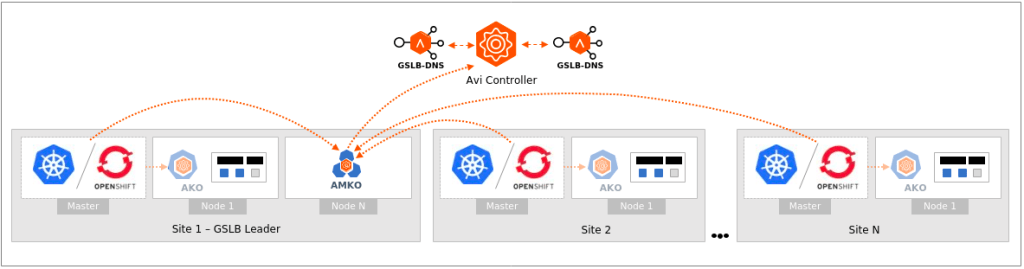
AMKO Prerequisites
Before deploying AMKO we need the following,
- Create Global-DNS Service. This service should be different than the one used for Local-DNS. You should delegate your Global Domain to this Virtual Service (or just point to it as your DNS Server).
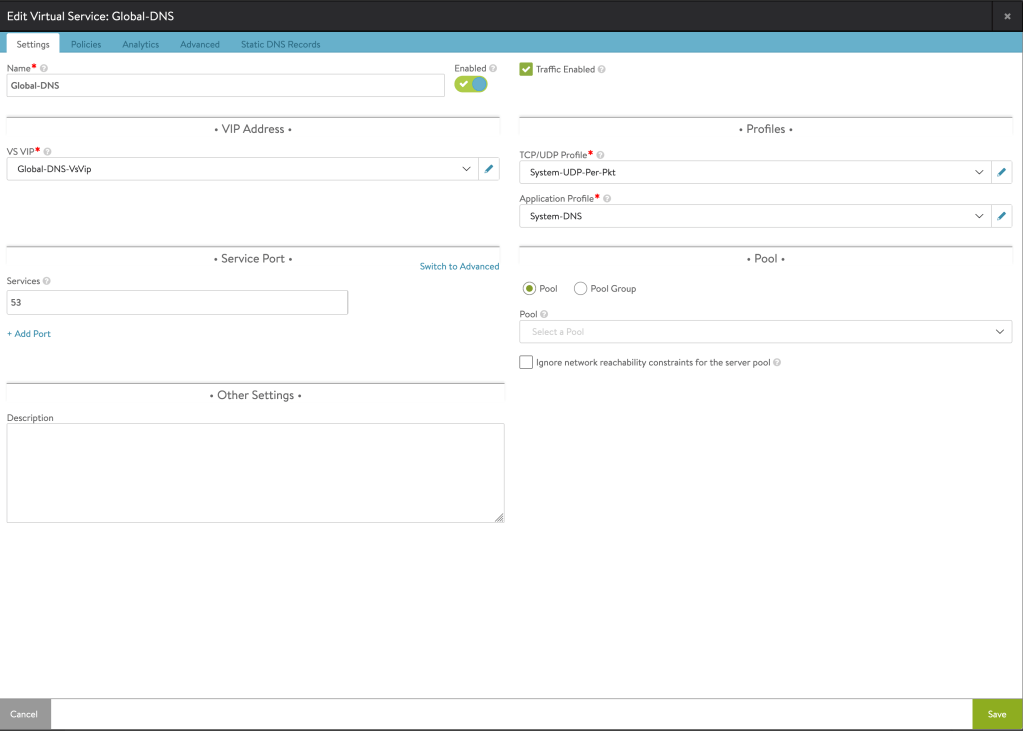
- Enable GSLB in one or more NSX-ALB Controllers.

- Deploy AKO in our targeted Clusters. You can see below examples
Tanzu Kubernetes Cluster Ingress with NSX-ALB
OpenShift Integration with NSX-ALB)
I am using one OpenShift and one TKG Clusters.
AMKO Deployment
First we need to deploy a secret that allow AMKO to access all targeted clusters. We can do that using a combined kubeconfig file for those clusters.
For OpenShift, you can find the kubeconfig file in CLUSTER-FOLDER/auth/kubeconfig
For Tanzu, we need to generate a permanent kubeconfig because the one we use to access the cluster is rotating every 10 hours. To get a permanent one, we can follow this procedure.
Once we have both files we can combine them using kubectl config view –flatten
export KUBECONFIG=ocp-kubeconfig:tkg-kubeconfig
kubectl config view --flatten > gslb-members
You can perform above step manually or any other way you are comfortable with.
Now that we have the combined kubeconfig, we can create the secret. I am doing that in the TKG Cluster
kubectl create secret generic gslb-config-secret --from-file gslb-members -n avi-systemAdd below repository to your helm client. If already available when AKO was deployed, you may need to update your repo using helm repo update:
helm repo update

###or###

helm show chart oci://projects.registry.vmware.com/ako/helm-charts/amko --version 1.10.1
Use the values.yaml from this repository to provide values related to Avi configuration. To get the values.yaml for a release, run the following command
helm show values oci://projects.registry.vmware.com/ako/helm-charts/amko --version 1.10.1 > values.yamlEdit the values file with your environment variables. I posted mine here (without controller password)
The main config is the correct contexts (members) names that matches your kubeconfig file, and to configure your selection criteria. I am using below selection criteria
namespaceSelector:
    label:
      ns: gslb
Based on my selection criteria, AMKO will create a GSLB entry for any Ingress/Route/Loadbalancer inside namespaces labeled (ns: gslb). You can choose to use more specific selection criteria per application.
I am using Custom Global FQDN which will allow me to have a different FQDN for the global entry than the local ones. This option will require a HostRule CRD to be applied to the Ingress Entries to customize the global FQDN. If you chose to use same FQDN, then HostRules are not required. I will show an example of the CRD later.
Now lets deploy AMKO
helm install --generate-name oci://projects.registry.vmware.com/ako/helm-charts/amko --version 1.10.1 -f /path/to/values.yaml --set ControllerSettings.controllerHost=<controller IP or Hostname> --set avicredentials.username=<avi-ctrl-username> --set avicredentials.password=<avi-ctrl-password> --set AKOSettings.primaryInstance=true --namespace=avi-systemDeploying Test Application
For this Demo I am using below Domain names,
- TKG: tkg.k8s.vmwdxb.com
- OCP: ocp.k8s.vmwdxb.com
- Global: k8s.vmwdxb.com
Lets start by deploying a test application on both clusters
kubectl create ns hipster

kubectl apply -f https://raw.githubusercontent.com/aidrees/k8s-lab/master/hipster-no-lb.yaml -n hipster
Label the namespace with our selection criteria on both clusters
kubectl label namespaces hipster ns=gslbDeploy Ingress on our TKG Cluster
k apply -f hispter-ingress.yaml -n hipster

##hipster-ingress.yaml
apiVersion: networking.k8s.io/v1
kind: Ingress
metadata:
  name: hipster-ingress
  labels:
    app: hipster
spec:
  rules:
  - host: "hipster.tkg.k8s.vmwdxb.com"
    http:
      paths:
      - pathType: Prefix
        path: "/"
        backend:
          service:
            name: frontend
            port:
              number: 80
Apply the HostRule (note the gslb fqdn). This step is optional if custom global fqdn is not used. HostRule is a CRD that allow the customization for our Ingress/Route to enable NSX-ALB advanced features such as WAF, Cert, policies, … etc
k apply -f hipster-tkg-host-rule.yml -n hipster

##hipster-tkg-host-rule.yml
apiVersion: ako.vmware.com/v1alpha1
kind: HostRule
metadata:
  name: hipster-tkg-host-rule
  namespace: hipster
spec:
  virtualhost:
    fqdn: hipster.tkg.k8s.vmwdxb.com
    enableVirtualHost: true
    tls: # optional
      sslKeyCertificate:
        name: System-Default-Cert
        type: ref
      sslProfile: System-Standard-PFS
      termination: edge
    gslb:
      fqdn: hipster.k8s.vmwdxb.com
    #httpPolicy:
    #  policySets:
    #  -  System-HTTP
    #  overwrite: false
    #datascripts:
    #- tkg-ds
    wafPolicy: System-WAF-Policy
    #applicationProfile: System-HTTP
    #analyticsProfile: System-Analytics-Profile
    #errorPageProfile: Custom-Error-Page-Profile
Deploy a Route (OpenShift equivalent to Ingress) on the OpenShift Cluster
oc apply -f hispter-ingress.yaml -n hipster

##hispter-ingress.yaml
kind: Route
apiVersion: route.openshift.io/v1
metadata:
  name: hipster-ocp-route
  namespace: hipster
  labels: {}
spec:
  to:
    kind: Service
    name: frontend
  tls: null
  host: hipster.ocp.k8s.vmwdxb.com
  port:
    targetPort: http
Apply the HostRule (note the gslb fqdn). This step is optional if custom global fqdn is not used.
k apply -f hipster-ocp-host-rule.yml -n hipster

##hipster-ocp-host-rule.yml
apiVersion: ako.vmware.com/v1alpha1
kind: HostRule
metadata:
  name: hipster-ocp-host-rule
  namespace: hipster
spec:
  virtualhost:
    fqdn: hipster.ocp.k8s.vmwdxb.com
    enableVirtualHost: true
    tls: # optional
      sslKeyCertificate:
        name: System-Default-Cert
        type: ref
      sslProfile: System-Standard-PFS
      termination: edge
    gslb:
      fqdn: hipster.k8s.vmwdxb.com
    #httpPolicy:
    #  policySets:
    #  -  System-HTTP
    #  overwrite: false
    #datascripts:
    #- ocp-ds
    wafPolicy: System-WAF-Policy
    #applicationProfile: System-HTTP
    #analyticsProfile: System-Analytics-Profile
    #errorPageProfile: Custom-Error-Page-Profile
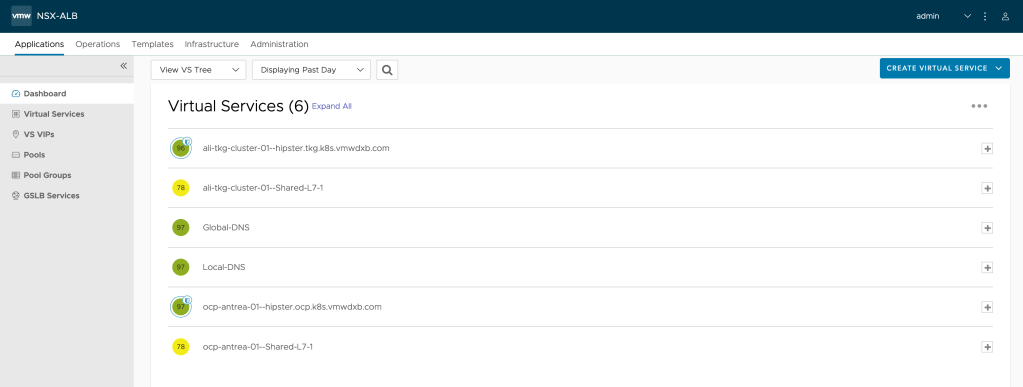
Now we should be able to see our Ingress and Route in NSX-ALB Controller
And we can see the GSLB Services created,
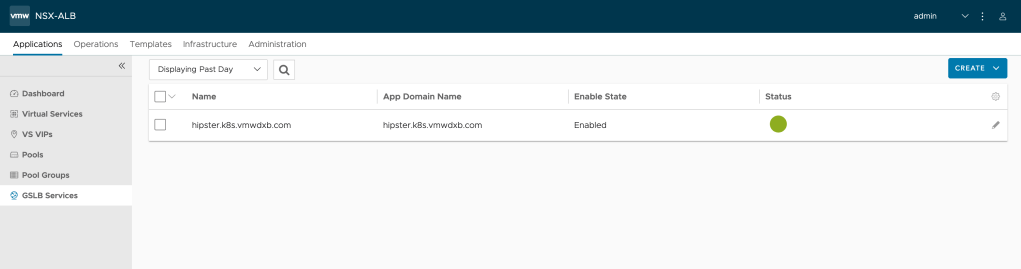
GSLB Members,

And we can access our application using the global FQDN (hipster.k8s.vmwdxb.com)

Lets test using “dig” pointing to the Global-DNS Service as a DNS server
 while true; do dig hipster.k8s.vmwdxb.com +short @192.168.29.8; sleep 2; done
192.168.29.4
192.168.29.6
192.168.29.4
192.168.29.6
192.168.29.4
192.168.29.6
We can see that our FQDN is pointing to both clusters. Please note that you can change the traffic split ratio per site and the Algorithm using GlobalDeploymentPolicy CRD for AMKO.
In conclusion, NSX-ALB has the ability to provide Automated GSLB Service for Kubernetes which allow organizationw to overcome the challenge of deploying Application on multiple Kubernetes Clusters.
Thank you for Reading!
 Yalla Virtual