
NSX-ALB could add a lot of values to OpenShift compared to the built-in OpenShift Router. The OpenShift Router is limited to OpenShift Routes and Ingress (HTTP/HTTPS Load Balancing) with very limited visibility. While NSX-ALB will add below main values,
- OpenShift Routes support
- Service Type Load Balancer (L4 Load Balancing)
- Very rich Analaytics
- Web Application Firewall (WAF)
- Automated GSLB
- Built in DNS Service.
- And Centralised Controller for all your K8s Clusters and workloads
All above features are typically needed in a production OpenShift deployments, and NSX-ALB provides them all in a single solution.
On top of that, there are major architecture and operational differences. The OpenShift Router is deployed and managed per cluster and typically managed by the platform team. While NSX-ALB will provide a centralised controller for all the clusters with federation support. That architecture will empower the network admin to see what is going on without standing on the way of the developers.
NSX-ALB has multiple components,
- NSX-ALB Controller(s) for mangement
- Service Engines VMs for Data Plane (deployed automatically on demand)
- Avi Kubernetes Operator (AKO) for OpenShift and K8s integration
- Avi Multi-Cluster Kubernetes Operator (AMKO) for GSLB in Multi-Cluster environments (I will leave that component for another post).

NSX-ALB Prerequisites
Before deploying AKO, We need to configure below prerequisites in NSX-ALB Controller,
- Configure Infrastructure Cloud (I am using vCenter Cloud, feel free to use any cloud)
- Create Service Engine Group per Cluster (I need that because I am deploying AKO in ClusterIP mode for better visibility and health monitors)
- Configure IPAM (for the VIPs) and a DNS profiles and assign them to the Infrastructure Cloud.
- Configure Management, Data (VIPs), and Workloads Networks (OpenShift Nodes Network)
- Configure default route for Data (VIPs) Network (or BGP)
- Configure a DNS Service
- Configure a DNS Domain Delegation to our DNS Service. The domain should match to what is configured in the DNS Profile and point to our DNS Service.
I am not going through the details of the above steps since they are standard NSX-ALB config and not OpenShift specific.
Deploying AKO
From our OpenShift Cluster,
Step 1: Create the avi-system namespace:
kubectl create ns avi-systemStep 2: Add this repository to your helm CLI
helm repo add ako https://projects.registry.vmware.com/chartrepo/akoStep 3: Search the available charts for AKO
helm search repo
NAME                  	CHART VERSION	APP VERSION	DESCRIPTION
ako/ako               	1.10.1       	1.10.1     	A helm chart for Avi Kubernetes Operator
Use the values.yaml from this chart to edit values related to Avi configuration. To get the values.yaml for a release, run the following command, then copy the file to modify defaults for a specific cluster. My cluster name is ocp-antrea-01
helm show values ako/ako --version 1.10.1 > values.yaml
cp values.yaml ocp-antrea-01-values.yaml
vim ocp-antrea-01-values.yaml
Here is my values.yaml file, more details could be found on AKO Github Page
replicaCount: 1

image:
  repository: projects.registry.vmware.com/ako/ako
  pullPolicy: IfNotPresent


AKOSettings:
  primaryInstance: true
  enableEvents: 'true'
  logLevel: WARN
  fullSyncFrequency: '1800'
  apiServerPort: 8080
  deleteConfig: 'false'
  disableStaticRouteSync: 'false'
  clusterName: ocp-antrea-01
  cniPlugin: 'antrea'
  layer7Only: false
  namespaceSelector:
    labelKey: ''
    labelValue: ''
  servicesAPI: false
  vipPerNamespace: 'false'
  istioEnabled: false
  blockedNamespaceList: []
  ipFamily: ''
  useDefaultSecretsOnly: 'false' # If this flag is set to true, AKO will only handle default secrets from the namespace where AKO is installed.
  # This flag is applicable only to Openshift clusters.

  nodeNetworkList:
    - networkName: "OCP-Nodes-Segment"
      cidrs:
        - 192.168.99.0/24
  enableRHI: false
  nsxtT1LR: ''
  bgpPeerLabels: []
  vipNetworkList:
    - networkName: NSX-ALB-Data
      cidr: 192.168.29.0/24

L7Settings:
  defaultIngController: 'true'
  noPGForSNI: false
  serviceType: ClusterIP # enum NodePort|ClusterIP|NodePortLocal
  shardVSSize: LARGE
  passthroughShardSize: SMALL
  enableMCI: 'false'

L4Settings:
  defaultDomain: ''
  autoFQDN: default

ControllerSettings:
  serviceEngineGroupName: ocp-antrea-01
  controllerVersion: ''
  cloudName: vcsa-dc-02
  controllerHost: ''
  tenantName: admin

nodePortSelector: # Only applicable if serviceType is NodePort
  key: ''
  value: ''

resources:
  limits:
    cpu: 350m
    memory: 400Mi
  requests:
    cpu: 200m
    memory: 300Mi

securityContext: {}

podSecurityContext: {}

rbac:
  # Creates the pod security policy if set to true
  pspEnable: false


avicredentials:
  username: ''
  password: ''
  authtoken:
  certificateAuthorityData:


persistentVolumeClaim: ''
mountPath: /log
logFile: avi.log
Step 4: Install AKO (modify values.yaml file name, Controller IP, and Password)
helm install ako/ako --generate-name --version 1.10.1 -f ocp-antrea-01-values.yaml --set ControllerSettings.controllerHost=x.x.x.x --set avicredentials.username=admin --set avicredentials.password=PASSWROD --set AKOSettings.primaryInstance=true --namespace=avi-systemCheck AKO Status
oc get pods -n avi-system
NAME    READY   STATUS    RESTARTS   AGE
ako-0   1/1     Running   0          34s
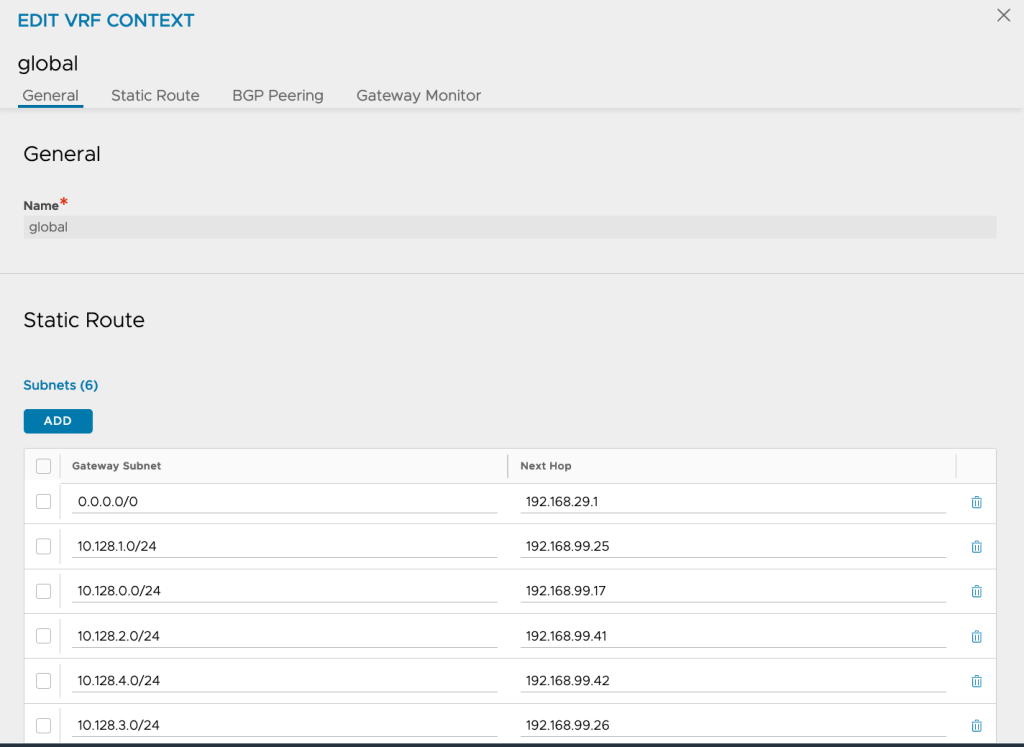
Check that AKO managed to configure Static Routes in the Avi Controller to reach the pods. A route entry per node should be seen (Infrastructure>>VRF Context>>Select your Cloud>>Edit Global)
Now AKO is ready to be used!
Deploy a Test Application
Deploy a Test Application (without Route, Ingress or LB)
oc create ns hipster

oc apply -f https://raw.githubusercontent.com/aidrees/k8s-lab/master/hipster-no-lb.yaml -n hipster
Now lets deploy an OpenShift Route with the domain name used in NSX-ALB DNS Profile. I am using OpenShift UI for this step, feel free to use CLI for this step

Here is a YAML if you want to use the CLI,
kind: Route
apiVersion: route.openshift.io/v1
metadata:
  name: hipster-ocp-route
  namespace: hipster
  labels: {}
spec:
  to:
    kind: Service
    name: frontend
  tls: null
  host: hipster.ocp.k8s.vmwdxb.com
  port:
    targetPort: http
Now we should be able to see that Route in NSX-ALB Controller, but since this is our first Route, we will need to wait for NSX-ALB to create a Service Engine (or multiple depending on our HA policy in the Service Engine Group) for this OpenShift Cluster

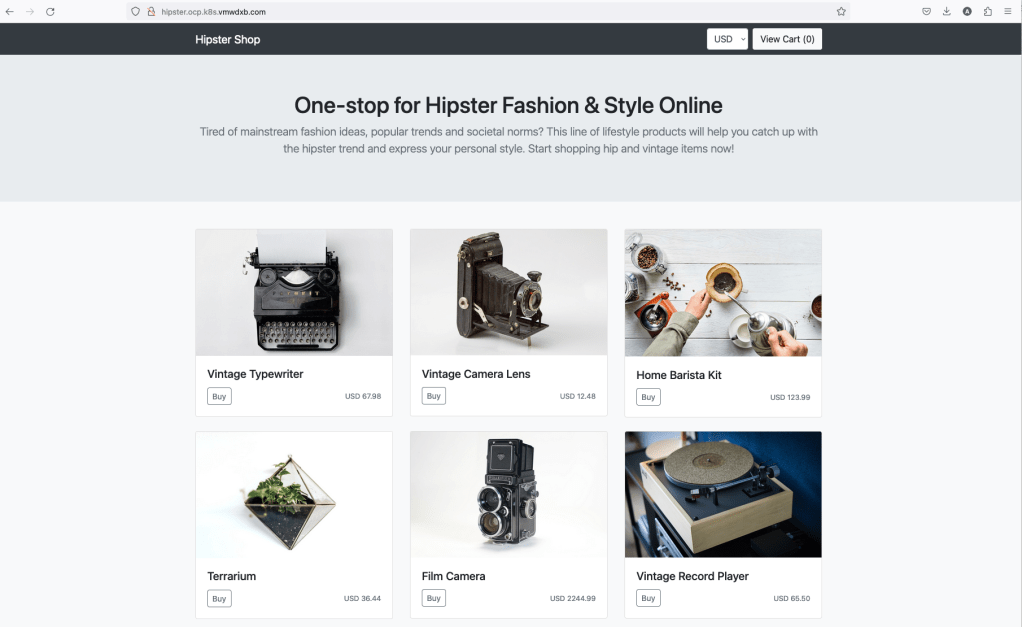
Now we can access our application. We can access because NSX-ALB automatically creates a DNS Record for it, and we already created a sub-domain delegation in our DNS Server.
Securing OpenShift Routes
In this section I will enable WAF and assign a TLS Certificate for HTTPS access to my OpenShift Route. The nice thing about NSX-ALB, that we can customize our Ingress/Route using CRDs without the need to use annotations or touch the NSX-ALB Controller assuming our policies, profiles, and scripts are already created. I am using the default ones.
apiVersion: ako.vmware.com/v1alpha1
kind: HostRule
metadata:
  name: hipster-ocp-host-rule
  namespace: hipster
spec:
  virtualhost:
    fqdn: hipster.ocp.k8s.vmwdxb.com
    enableVirtualHost: true
    tls: # optional
      sslKeyCertificate:
        name: System-Default-Cert
        type: ref
      sslProfile: System-Standard-PFS
      termination: edge
    #gslb:
    #  fqdn: hipster.k8s.vmwdxb.com
    #httpPolicy:
    #  policySets:
    #  -  System-HTTP
    #  overwrite: false
    #datascripts:
    #- ocp-ds
    wafPolicy: System-WAF-Policy
    #applicationProfile: System-HTTP
    #analyticsProfile: System-Analytics-Profile
    #errorPageProfile: Custom-Error-Page-Profile
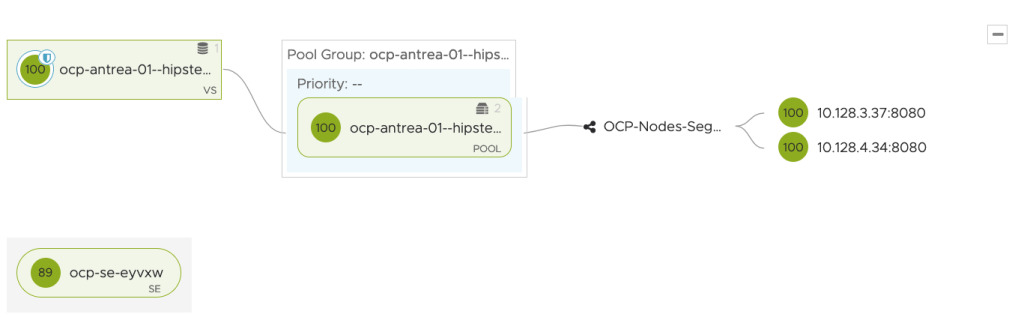
oc apply -f hipster-ocp-host-rule.ymlWe can see now that WAF is enabled (shield icon in the virtual service) to our Route and health increased to 100. I scaled Frontend deployment to 2 pods too.
Analytics
I will send some malicious traffic to our route and notice the analytics.
Overall Performance:

Logs, you can see that some of them are flagged by WAF

Lets take a deeper look into one of the flagged ones by WAF,


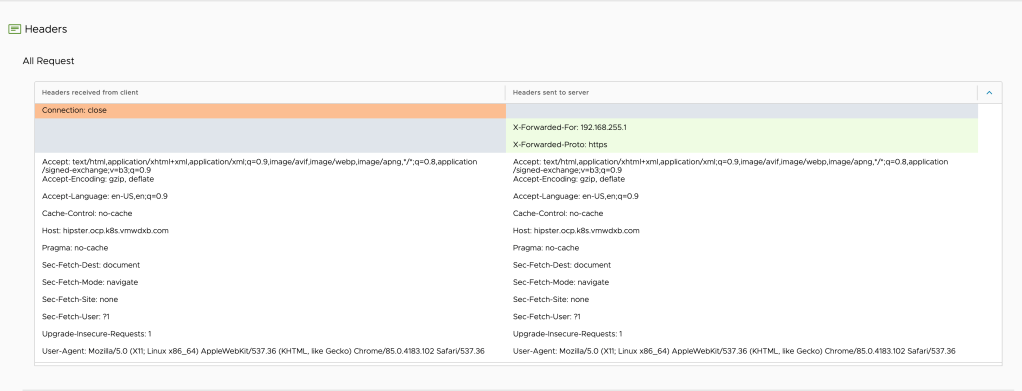
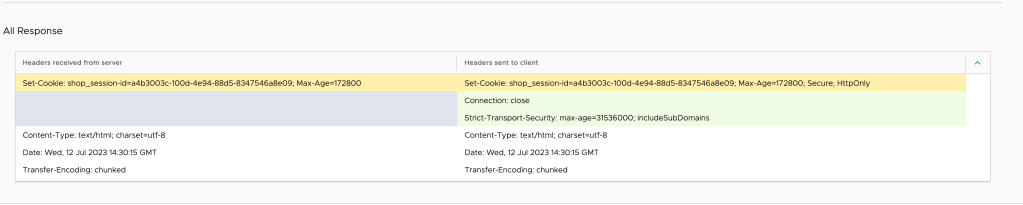
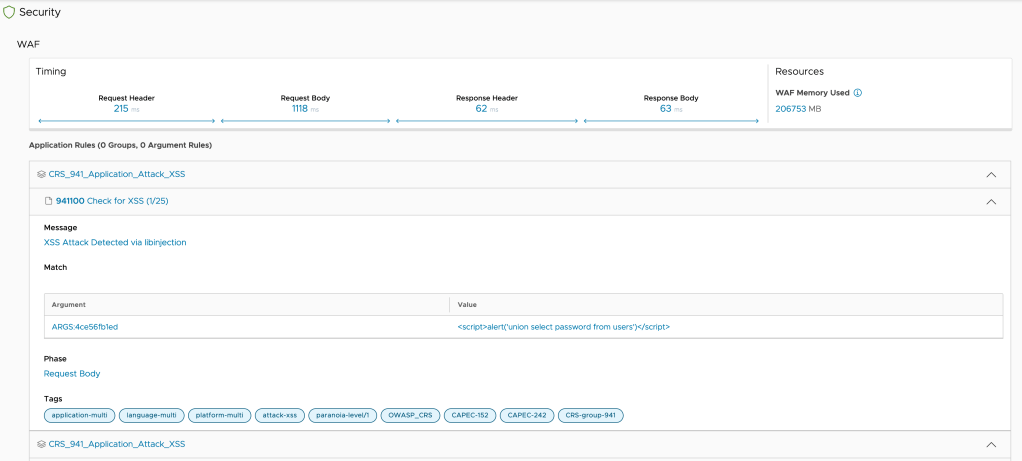
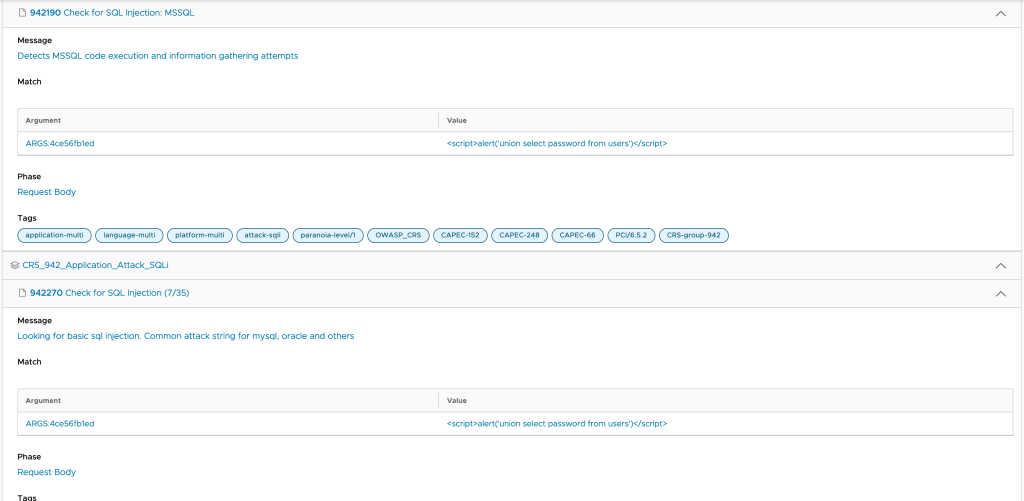
As you can see above, there is a lot of data captured per request, which will give very deep insight on performance and security risks.
Please note that I am only touching the surface here. NSX-ALB will provide what you would expect from an Enterprise ADC System and more, such as DOS Protection, rate Limiting, Authentication and Authorization, Network Security, Web Application Security including Bot Classification and Detection, SaaS Services, and others.
As you can see in this post, there is no need to compromise on application delivery and security on K8s and OpenShift. NSX-ALB will provide all enterprise requirements for containers similar to VMs, Public Cloud Instances, and Bare-Metal servers.
Please don’t hesitate to comment and share your feedback
Thank you for reading!
 Yalla Virtual
One thought on “OpenShift Integration with NSX-ALB”